SheetSplit PDF for LibreOffice Calc
LibreOffice Calc / PDF export
1.0.1 Experimental · WindowsSelected tabs. Separate PDFs. Existing print layouts.
Turn selected Calc tabs into separate, automatically named PDFs while retaining each sheet's existing native print layout in the tested workflow.
One PDF per selected sheet does not mean one page per PDF. A sheet's existing print layout can span multiple pages. XLSX files are not supported.
Requirements
Windows x64 and LibreOffice Calc 26.8.0.3 tested. Other LibreOffice versions have not been tested.
- Locally saved, unencrypted ODS workbook with no unsaved changes
- Selected visible sheets only
- An existing local output folder and unique output names
What it does
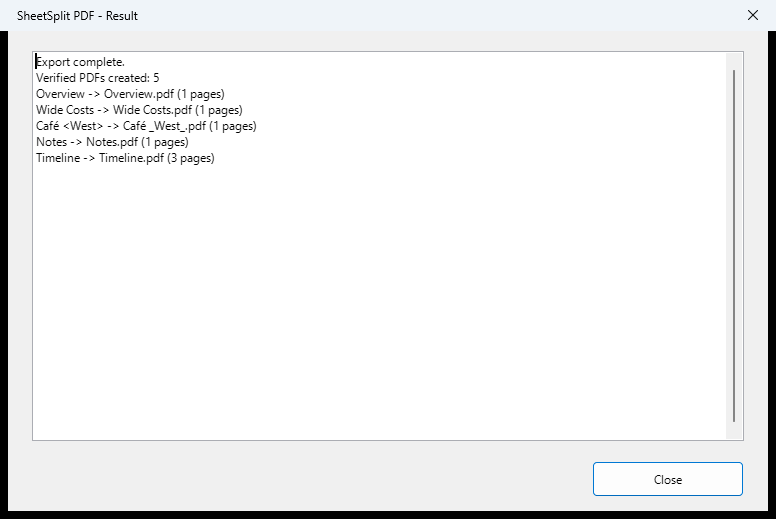
- Creates one PDF per selected visible sheet
- Derives filenames from sheet names and sanitizes unsupported Windows filename characters
- Previews exact filenames and refuses duplicate names or existing targets
- Preserves tested native print layout; workbook bytes and modified state remained unchanged in tested workflows
Read these limits first
- Saved ODS only: no XLS, XLSX or CSV
- No hidden-sheet export, network folders, PDF merging or multiple-workbook queues
- No email or scheduling; cloud-synchronized folders are untested
- Complex workbooks and fonts may produce LibreOffice-specific rendering differences; no universal layout guarantee
- Empty sheets, unchecked PDFs and PDFs over 128 MB are refused
- A stopped batch leaves completed files; a disk failure can leave a partial file. Inspect every output.
Install and use
- Download the OXT. In LibreOffice, choose Tools > Extensions > Add, select the file, and choose Only for me if asked. Fully restart LibreOffice.
- Open your saved ODS and choose Tools > Add-Ons > SheetSplit PDF...
- Ctrl-click the visible sheets you want, choose an existing local output folder, and review the filename table.
- Choose Export, read the result, and inspect the PDFs. To uninstall, remove SheetSplit PDF in Tools > Extensions and restart; your PDFs and workbooks remain.
Files, privacy and trust
The extension needs no network connection and does not intentionally edit or save the workbook. LibreOffice's own update checks and workbook external links are separate host features.
Unsigned LibreOffice OXT extension. Supplied through the marketplace you choose.
Independent extension; not affiliated with The Document Foundation.
Developed with generative-AI assistance and tested on bounded synthetic workflows. This product does not use AI or a cloud service at runtime.