SVG Link Preflight — V1.0.2 Experimental
SVG / linked images
1.0.2 Experimental · WindowsFind the path problem before opening the artwork.
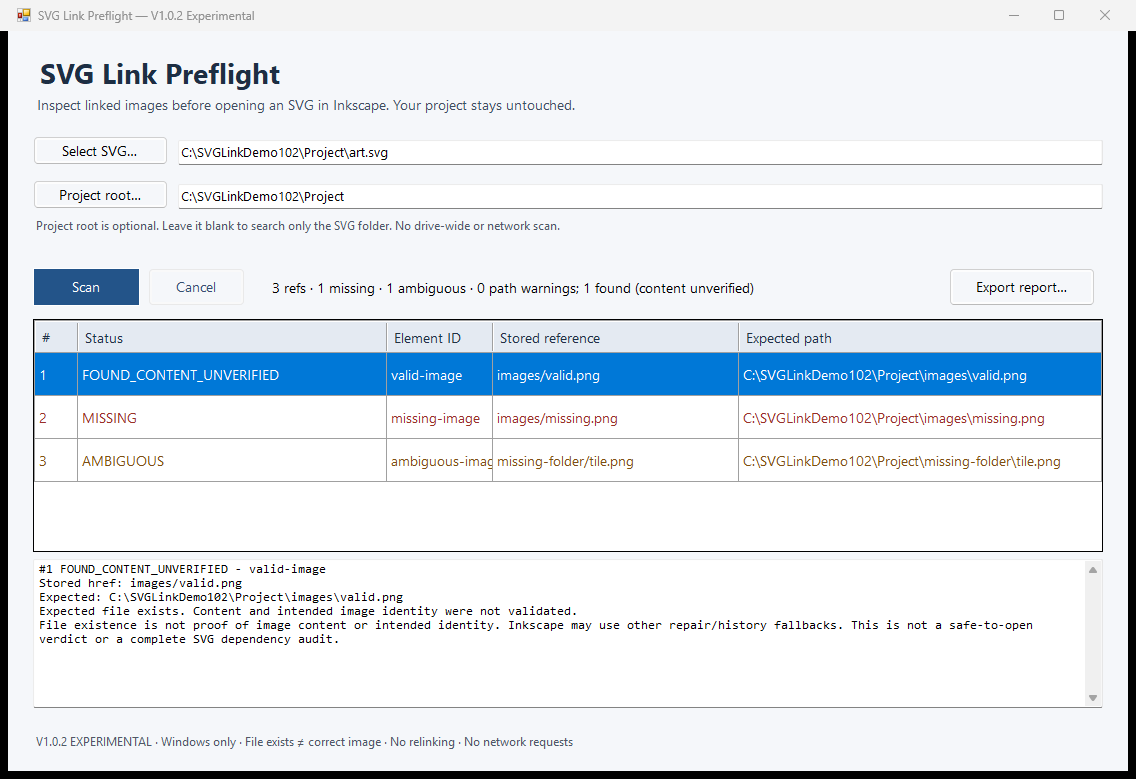
Inspect one SVG's stored image references, expected local paths and bounded same-name alternatives. Export a new report without changing the project.
FOUND_CONTENT_UNVERIFIED means the path exists. It does not mean the image is correct. This is a checker, not a repair tool.
Requirements
Windows x64. Tested on Windows 11 with .NET Framework 4.8.1; a compatible installed .NET Framework is required.
- One local SVG on a fixed drive
- Optional containing Project Root for a wider bounded search
- No Inkscape installation, Python, account or administrator rights needed for ordinary use
What it does
- Shows stored references and expected local paths
- Reports missing targets and competing same-name alternatives
- Keeps embedded, unsupported and warning cases visible
- Exports a new text or JSON report outside the inspected project
Read these limits first
- Does not verify image identity: an existing file can still contain the wrong image
- Does not repair or relink the SVG, choose replacements, or predict every Inkscape fallback
- Does not audit fonts, CSS, scripts or every SVG dependency
- No Linux/macOS qualification; network/device paths, raw drive hrefs and unusual path forms are unsupported
- Bounded search: 5 MiB SVG, 1,000 references, 10,000 entries, depth 12 and about three seconds of active search; known junctions are skipped
Install and use
- Extract the complete ZIP and open SVGLinkPreflight.exe.
- Select an SVG. Leave Project Root blank to search its folder and subfolders, or choose a containing folder.
- Scan and inspect the stored reference, expected path and any same-name alternatives.
- If needed, export a report to a new filename outside the project. Check image content separately before making your own changes.
Files, privacy and trust
Local/offline, with no telemetry, login or automatic updates. Inputs are read only. Your explicitly exported report can contain full paths and embedded reference data; redact it before sharing.
Windows ZIP. Unsigned application; unfamiliar-download warnings may occur. Do not disable Windows security to run it.
Independent utility; not endorsed by Inkscape.
Developed with generative-AI assistance and tested on bounded synthetic workflows. This product does not use AI or a cloud service at runtime.