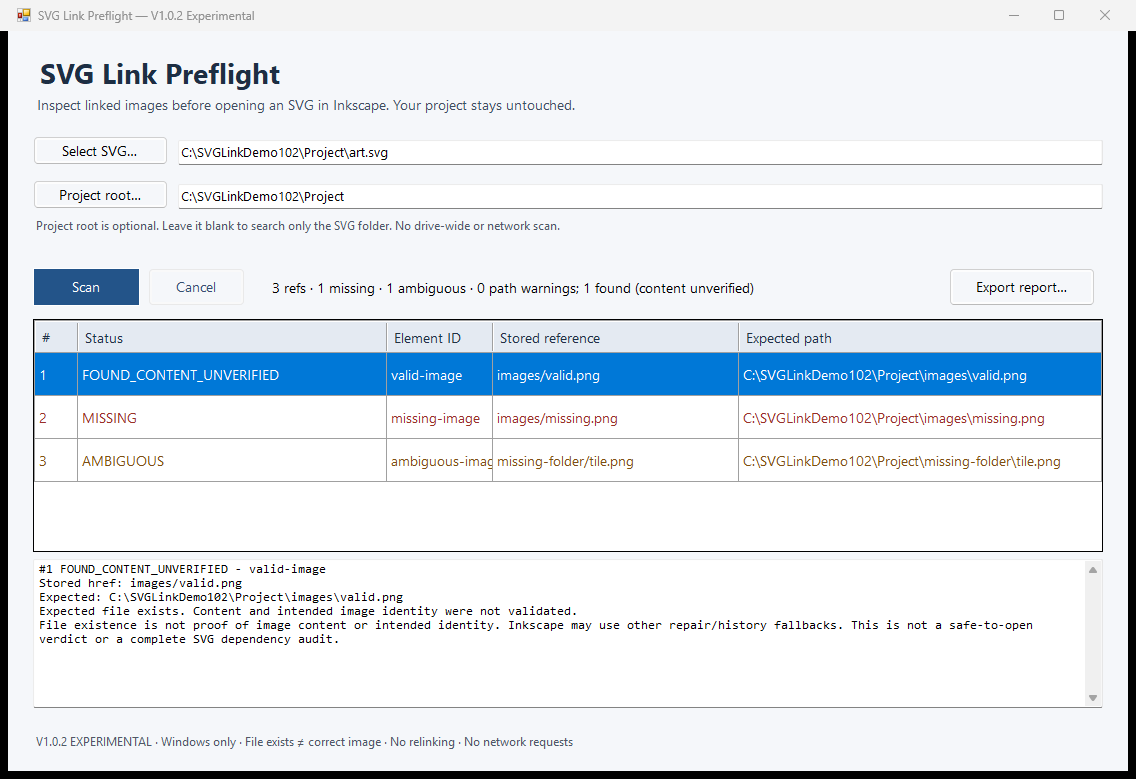
A file path and an image's identity are different checks
An SVG may refer to an external image rather than contain all of its image data. Moving the SVG, moving its companion folders, or receiving only part of a project can leave those references pointing to missing files.
A filename match is not enough to prove correctness. Two folders can each contain a file called tile.png with different content. Even if the expected path exists, compare the actual image with a trusted source. Do not treat a successful path check as a safe-to-open verdict or a complete SVG audit.
Start with a manual inspection
For a small, familiar project, manual inspection may be enough. Inkscape's behavior can also depend on history and fallback handling. This guide does not claim that every missing link produces the same visible result.
- Keep a backup of the original SVG and its companion image folders.
- Inspect the image reference and determine which local path it names. Relative links depend on the SVG's folder.
- Check whether that target exists. If it is missing, look within the supplied project for candidate files rather than searching an entire drive.
- Compare candidate image content with the intended artwork. Make any repair deliberately in your normal editing workflow, then review the result.
Where a path checker saves work
SVG Link Preflight gathers the stored reference, expected local path and bounded same-name search results into one view. The optional containing Project Root widens the search while keeping it within the project you choose.
MISSING means the expected target is absent. AMBIGUOUS means competing same-name alternatives were found for a missing target; the tool chooses none. FOUND_CONTENT_UNVERIFIED means only that the expected file exists. Embedded references, path warnings and unsupported paths remain visible instead of being silently accepted.
Use it when the question is about paths
The supported release is a local, read-only Windows x64 utility. It can export a new text or JSON report, but it does not change the SVG, repair links, verify image content, or audit fonts, CSS and scripts.
If you need automatic relinking, a content-identity check or universal Inkscape compatibility, this product does not meet that need. Review the product's environment and search limits before buying.