Start with the recording and timeline you actually have
Use a finalized recording with existing named chapters. A chapter name marks an intended point in the original recording; trimming, moving or changing the speed of a clip changes its relationship to the timeline.
For a few markers, manual entry in your editor may be enough: compare each known chapter time with the recording, enter its name at the matching timeline position, save a separate project and review the result. This guide makes no claim that Shotcut lacks manual markers.
Check the complete supported case before buying
Windows with installed .NET Framework 4.8+, complete local Shotcut 26.8.1, and a finalized genuine OBS Hybrid MP4 at constant 5, 30 or 60 fps; a matching saved project with exactly one complete untrimmed matching clip on one video track at 0:00, no filters, proxies, speed changes or existing markers; ordinary local paths and a new unused output beside the original project.
No MOV, arbitrary MP4 implementations, variable or other frame rates, mismatched FPS, multiple clips/tracks, trims, offsets, filters, proxies, speed changes, nested or edited timelines, existing-marker merging, network or linked paths, or unsupported saved-project representations. Chapters must be 1–1,000 distinct valid in-duration times and unique nonempty single-line names of at most 1,000 ordinary text characters; markers that overlap after frame mapping are refused. No in-place editing, media conversion, chapter inference or automatic repair.
Create and review a new project copy
Keep the original recording and project. The utility opens both read-only and checks their hashes before reporting COMPLETE.
- Extract the ZIP into a writable local folder; open OBSChapterBridge.exe.
- Use a complete Shotcut 26.8.1 installation. Standard Program Files locations are checked; for a custom installation, select its shotcut.exe with Find Shotcut.
- In Shotcut, put only the original recording on one video track at 0:00. Save before editing and close that project.
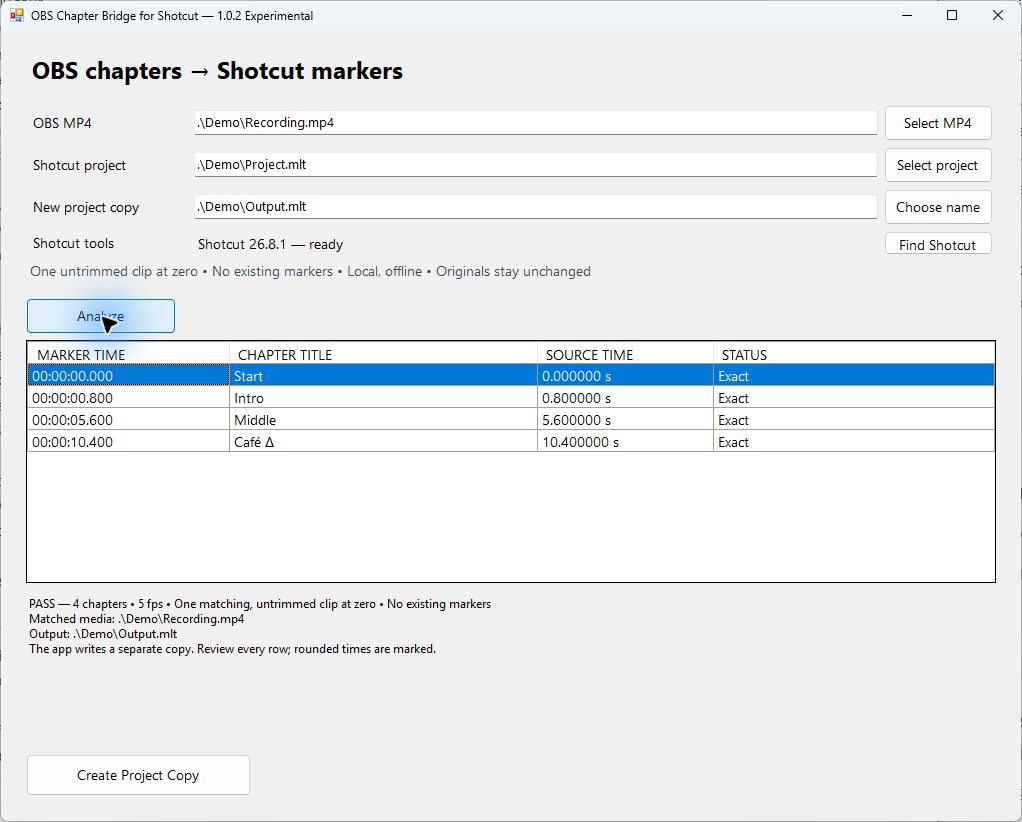
- Select your MP4 and saved project in Chapter Bridge. Choose a new unused output name in the original project's folder.
- Analyze and review every title/time. Create Project Copy and wait for COMPLETE.
- Open the new copy in Shotcut and review its markers before editing.
A refusal is a boundary to resolve
Each refusal gives a reason, the supported requirement and a Next action. Missing tools: select a complete Shotcut installation or install the required version separately. Edited project: create a new project using only the full original recording at 0:00. No chapters: add named chapters during a new OBS Hybrid MP4 recording. No missing chapters are guessed. Existing output: choose an unused adjacent filename; the existing file is preserved.
Analyze refusals create no output. If Create stops, no finished copy was confirmed: do not use any output from that attempt. The app does not modify the originals; close programs writing them and Analyze again when an input changes.
An edited project requires a new matching project with only the complete original clip at 0:00. Do not expect the utility to infer your edits, repair a file or merge existing markers.
Experimental scope, installation and uninstall
Compatibility is limited to the tested simple Shotcut 26.8.1 setup. Other and future versions are not automatically supported. Review the generated project before relying on it; no production-fitness guarantee is provided. Not affiliated with, endorsed by or supported by OBS Studio or Shotcut.
The US$5 one-time Windows download is an unsigned executable plus README. Install the required .NET Framework and exact complete Shotcut version separately; no third-party binaries are bundled.
Close the app and delete its extracted application folder to uninstall, keeping your own recordings and projects. The app saves no settings; Windows may retain recent-file history.